About this app
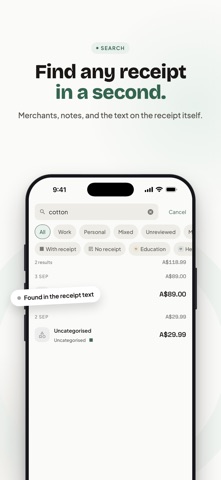
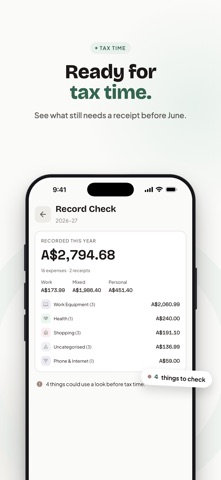
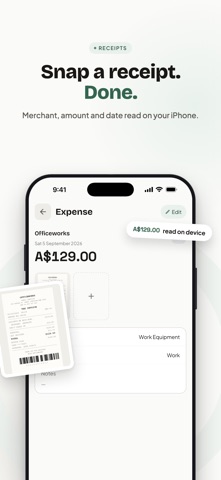
HeyJerni turns a shoebox of receipts into a tidy, tax-ready record — without sending a single expense to the cloud. Photograph a receipt (or a whole stack) and the on-device AI reads the amount, merchant and date for you. Ask questions about your own spending in plain English. At tax time, export everything your accountant needs in one tap. No account, no bank linking. SCAN ANY RECEIPT • Snap one receipt or a whole stack — each page becomes its own record • On-device AI extracts amount, merchant and date; you just review and save • Faded thermal paper is captured before it disappears • The app remembers which merchant belongs to which category IT LOGS ITSELF WHEN YOU TAP TO PAY • A one-time Shortcuts automation watches your Wallet transactions • Pay with your iPhone and the expense is already in your records • Merchant and amount arrive on their own — nothing to type • Entirely optional, and HeyJerni never sees your card details ASK HEYJERNI • "How much did I spend on groceries this month?" — answered instantly • Works in English and Chinese • Every figure is computed from your own records on your iPhone FIND ANYTHING IN A SECOND • Search merchants, notes, and the text printed on the receipts themselves • Filter by work, personal, mixed, unreviewed, or missing a receipt • Records grouped by day, each day with its own total TAX-TIME READY • Built around the Australian financial year (1 July – 30 June) • Export a Tax Pack: PDF summary + CSV of every expense + all receipt images • Mark work-use percentages and purpose on any expense • Record Check shows what still needs a receipt or a category before you lodge 100% PRIVATE — BY ARCHITECTURE • No account and no sign-up. We never learn who you are • No bank linking. No cloud sync, no servers holding your data • Records live in an AES-256 encrypted database on your iPhone • Ads in the free version are non-personalised; the app never asks for tracking permission • Backups are archives you create and keep yourself, wherever you choose WORKS OFFLINE After a one-time AI model download (about 1.3 GB, Wi-Fi recommended), scanning, categorising and asking all run with no internet connection at all. FREE — AND NOTHING IS LOCKED Every feature is free. A small banner ad keeps the lights on, and there are two ways to switch it off. Neither unlocks anything extra, because there is nothing extra to unlock: • Remove Ads Forever — a single one-time purchase • Monthly support tiers — for people who would rather chip in each month. Cancel any time in Settings → Apple ID → Subscriptions Requires iOS 16.4 or later. iPhone 12 or newer recommended for the smoothest on-device AI. Amounts are tracked in Australian dollars. HeyJerni is a record-keeping assistant, not a tax adviser. For your own entitlements, check the ATO website or a registered tax agent. Terms of Use: https://www.apple.com/legal/internet-services/itunes/dev/stdeula/ Privacy Policy: https://www.heyjerni.com/privacy
Latest release
What’s New
A complete rebuild around receipts and Australian tax time. • Scan a stack of receipts in one go — each page becomes its own record • Tap to pay and it logs itself — an optional Shortcuts automation turns each Wallet transaction into an expense • Ask HeyJerni: questions about your spending, answered on your iPhone • Search the text printed on the receipts themselves, not just merchants and notes • Tax Pack export: PDF summary, CSV and every receipt image in one archive • Record Check: see what is missing before you lodge • Full backup and restore — your archive, kept wherever you choose • Remove Ads Forever as a one-time purchase, or a monthly tier if you would rather support the work • Rebuilt design, faster AI, and a new app icon Everything still runs on-device. No account, no cloud, no bank linking.
Audience growth
Ratings growth
Baseline captured. Growth appears after the crawler observes a changed rating count.
Momentum comes from crawler snapshots for the tracked storefront. “Viral growth signal” means unusually fast recent rating gains; it is an indicator, not download data.
Price tracking
Price intelligence
First snapshot captured. The trend line starts after the next crawler price observation.
- First observed Sep 11, 2026 · 3:15 PM Free
Screenshots