About this app
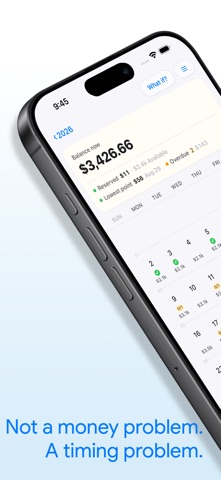
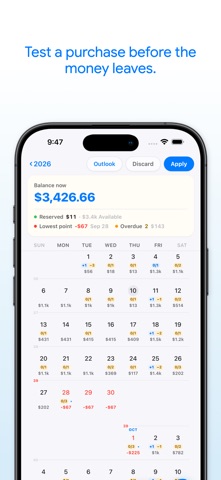
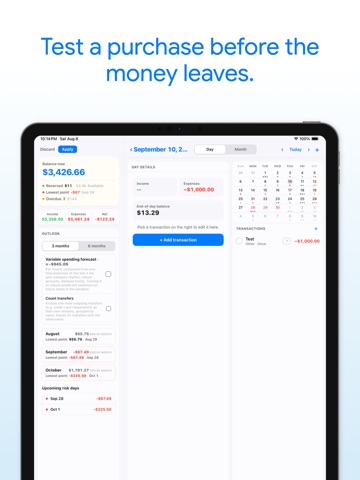
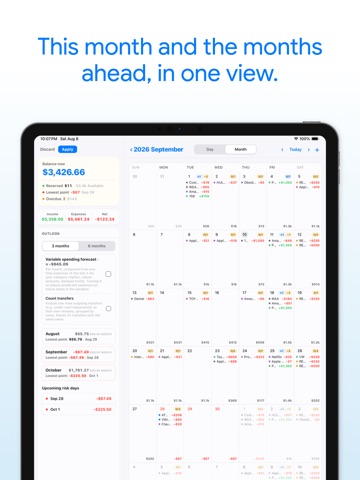
Where will your money really be tomorrow? Most financial apps tell you where your money went. JayCK Flow shows you where it's going next. Your paycheck has a date. Your bills have dates. Every decision changes your future balance. JayCK Flow turns your finances into a simple timeline so you can see your expected balance before the day arrives. YOUR FUTURE BALANCE, AT A GLANCE • Add income and see when money arrives • Schedule bills, subscriptions, and recurring payments • Visualize your balance across the whole calendar • Understand the impact of a purchase before you make it BEFORE A BIG PURCHASE, ASK "WHAT IF?" Add a potential purchase and watch how it changes every day after — before you spend a cent. KNOW YOUR LOWEST BALANCE DAY Green means on track. Yellow means pay attention. Red means a decision is coming — weeks in advance, not after an overdraft. ON YOUR HOME SCREEN • Four widgets: today's plan, your balance, the weeks around today, and the full month • Each widget has its own settings — show everything, or only what still needs you • Testing a purchase in "What if?" never moves your widgets. The Home Screen only ever shows what's real. FUTURE FIRST Traditional budgeting looks back: "Where did my money go?" JayCK Flow looks ahead: "What will my money look like tomorrow?" PRIVATE BY DESIGN • No bank connection required • Works fully offline — no account needed to start • Optional sync is end-to-end encrypted: your data is encrypted on your device with a passphrase only you know. We can't read it. • No ads, no tracking, no selling data Optional sync across your devices is available with JayCK Flow Premium. Money isn't only numbers. Money is time. Put your finances where they belong — on a calendar. Terms of Use (EULA): https://www.apple.com/legal/internet-services/itunes/dev/stdeula/
Latest release
What’s New
Your calendar, on your Home Screen. Four widgets, each with its own settings: • Day — today's items and where the balance lands, at a glance. • Balance — how much is really yours: reserved money, the lowest point ahead, anything overdue or still unconfirmed. • Day & Weeks — today beside last week, this week and next. • Month — the whole month as the app draws it, with day badges and projected balances. Tap a day and the app opens right there. One rule we kept on purpose: while you test a purchase in "What if?", the widgets do not move. Your Home Screen only ever shows what's real. Also in this release: • Charge a repeating expense to a card once — choose "this and following" and every later month follows on its own. • Analytics now answers two questions: "what left my account?" and "what did I spend on?" — card purchases finally show up by category in the second. • Cards can be hidden instead of deleted, and reordered or sorted your way. • Scrolling the calendar is smoother, and the app now runs at 120 Hz on ProMotion displays. Fixed • Amounts like 26.49 can be typed into debt fields again — the decimal point no longer vanishes as you type. • An optional end date can now be cleared with one tap, and the dates after it come back. • Months charged to a card no longer lose their card after a restart. • Double-tapping a button no longer zooms the app out of reach. As always: your data stays on your device unless you turn on sync, and sync is end-to-end encrypted — we can't read it.
Audience growth
Ratings growth
Momentum comes from crawler snapshots for the tracked storefront. “Viral growth signal” means unusually fast recent rating gains; it is an indicator, not download data.
Price tracking
Price intelligence
First snapshot captured. The trend line starts after the next crawler price observation.
- First observed Aug 20, 2026 · 10:56 PM Free
Screenshots