About this app
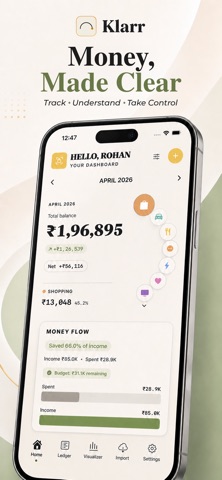
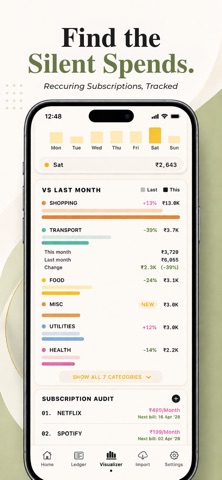
Klarr is a personal finance app that helps you see exactly where your money is going. Track your spending, import bank statements, scan receipts, and keep an eye on your subscriptions - all in one place, all stored privately on your device. IMPORT AND SCAN • Import bank statements from any bank in CSV, PDF, or spreadsheet format • Scan receipts with your camera to add transactions on the spot • Transactions are automatically sorted into the right categories • Duplicate transactions are detected and handled for you TRACK EVERYTHING • Add multiple accounts - bank accounts, credit cards, and wallets • Set monthly spending limits by category • See all your subscriptions in one place so nothing slips through • Track transfers between your own accounts SEE THE BIG PICTURE • Visual charts that show where your money comes from and where it goes • Spending by category, monthly comparisons, and trends over time • See how fast you are spending through the month • Budget progress so you always know where you stand YOUR PRIVACY MATTERS • Your data is stored locally on your device as the primary copy • While signed in, an encrypted backup syncs to your private account • No ads, no data selling, no third-party tracking • Export your data as a spreadsheet or PDF whenever you want ORGANIZE YOUR WAY • Create your own spending categories with custom colors and icons • Set rules to automatically tag transactions (e.g. "Netflix" goes to Entertainment) • Edit and organize imported transactions in bulk Whether you check in daily or do a monthly review, Klarr gives you a clear, honest picture of your finances - without the clutter, the ads, or the privacy concerns.
Latest release
What’s New
Bug fixes • Categories no longer appear twice when you edit a transaction or change its category. If your account picked up duplicate categories from syncing across devices, they're now merged automatically. • Deleting a category in Settings removes it for good - it no longer reappears afterwards. • Adding a category that already exists now tells you, instead of quietly creating a second copy.
Audience growth
Ratings growth
Baseline captured. Growth appears after the crawler observes a changed rating count.
Momentum comes from crawler snapshots for the tracked storefront. “Viral growth signal” means unusually fast recent rating gains; it is an indicator, not download data.
Price tracking
Price intelligence
First snapshot captured. The trend line starts after the next crawler price observation.
- First observed Sep 8, 2026 · 3:42 PM Free
Screenshots