About this app
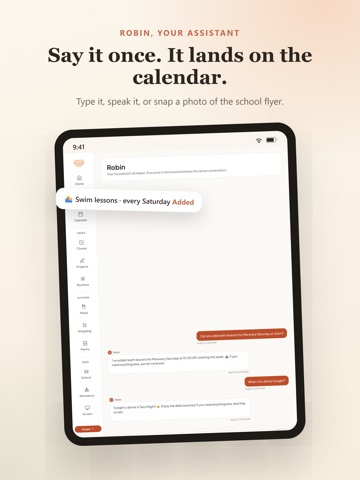
NestBoard is one calm home base for your whole household. The shared calendar, chores, meals, and lists that usually live on sticky notes, group texts, and memory. Built by a parent who got tired of the chaos. No ads. No selling your data. Just a little more calm for the people you love most. ONE CALENDAR EVERYONE CAN ACTUALLY SEE Bring in your existing Google or Outlook calendars, or subscribe to any iCloud or iCal feed, and see the whole family's week in one place. Color-coded by person, gentle reminders, and a "who's doing what" view that ends the 5 pm surprises. Repeats match real life too, whether that's every other week, every few months, or the first Friday of the month. CHORES KIDS CHECK OFF THEMSELVES Kid-friendly chore lists with streaks, badges, and a family leaderboard. Chores can rotate automatically between people, so nobody has to keep track of whose turn it is. Kids get free kid-mode seats, no email or account required, with kid-safe settings built in. SCREEN TIME THEY EARN Give each child a simple daily screen-time agreement, then decide how chores connect to it. Finished chores can add bonus minutes, or the day's time can stay locked until their chores are done. It is a shared tracker you both can see, not an app blocker, which makes it a conversation instead of a fight. DINNER, DECIDED Plan the week's meals, keep a pantry that tracks what you have, and build the grocery list from the plan. Import recipes from most cooking sites with one paste. WISH LISTS FOR BIRTHDAYS & HOLIDAYS Every family member keeps a wish list, so gift-giving gets easy, and surprises stay surprises. An optional family PIN keeps gift lists away from curious little eyes. MEET ROBIN Robin is your household's helper. Paste a school newsletter, forward a confirmation email, or ask, and Robin turns it into calendar events, reminders, and list items. Ask for "swim every weekday until school starts" or "date night every other Friday," and it lands as one clean repeating event. Adults only, never trained on your data. AND THE REST OF FAMILY LIFE Shared shopping lists that update in real time Gentle medication and supplement reminders for the household Routines for school mornings and bedtimes Family board for notes everyone should see Kiosk mode for the kitchen Works on iPhone, iPad, and the web, so everyone sees the same household Plus allowance, pet care, school assignments, carpools, and savings goals when you want them. Every one of these can be hidden from your menu if you don't want it, and your menu is yours alone, so one parent can keep it simple while another keeps everything visible. CALM BY DESIGN No ads, ever. No data selling, ever. No AI training on your family's information. One flat price for the whole household, with unlimited members, including grandparents and caregivers. Start with a 2-week free trial, no credit card required. Then it's one simple price for your whole household. Questions? A real person answers at hello@mynestboard.com, usually within a day. Privacy Policy: https://mynestboard.com/privacy Terms of Use: https://mynestboard.com/terms
Latest release
What’s New
The Week and Day calendars no longer hide the early morning. The hourly grid used to start at 6:00 AM to stay compact, which made a night shift invisible to the rest of the family. Now the grid watches your actual schedule: a 2:00 AM start opens up the 2:00 AM row, and a shift that runs past midnight shows on both days it touches. Households with no early events keep the same compact view as before. Ask Robin "what should I do?" and she answers with a short menu drawn from your household's real tasks, and you pick. The same picks appear in a new card on the dashboard, so a spare ten minutes has somewhere to go without anyone deciding for you. Setting up NestBoard no longer starts from a blank page. You can begin from an example setup built around what brought you here, including school and student life, and every example is clearly labeled and clearable with one tap once your own routines take over. The first-run tour is now a quick four-step introduction instead of a 35-step walkthrough, with the full tour still there whenever you want it. Optional email reminders for tasks: one email per task, only if you opt in, during setup or later in Settings. Nothing changes unless you turn it on. Also in this release: the morning check-in respects your quiet hours and can arrive atop your daily briefing email if there is no phone to push to, pending invites show on the Family page with one-tap resend and a board preview for the invitee, the dashboard forecast covers every day you can tap, and Robin can suggest chores that fit your kid's age from our age guide.
Audience growth
Ratings growth
Baseline captured. Growth appears after the crawler observes a changed rating count.
Momentum comes from crawler snapshots for the tracked storefront. “Viral growth signal” means unusually fast recent rating gains; it is an indicator, not download data.
Price tracking
Price intelligence
First snapshot captured. The trend line starts after the next crawler price observation.
- First observed Aug 21, 2026 · 7:27 PM Free
Screenshots