About this app
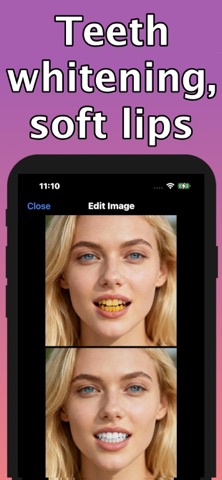
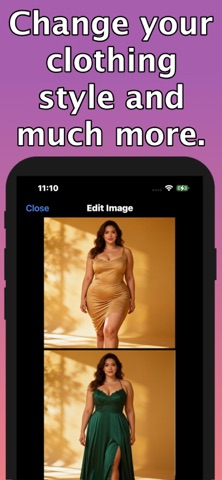
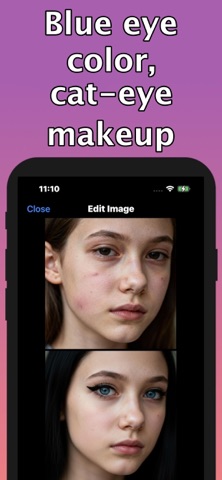
Transform photos instantly with suggestions — one tap, professional results. Whether you want to remove a distracting background, retouch a portrait, colorize old photos, or upscale to HD, our app gives smart, easy-to-apply edits that save time and boost results. Why users love this app - One‑tap personal suggestions: AI recommends the best edits for each photo so you get great results fast. - Background removal & replacement: perfect cutouts and instant new backgrounds. - Smart portrait retouching: skin smoothing, blemish removal, teeth whitening, eye enhancement. - Face makeup ideas & virtual try‑on: try lipstick, blush and more without buying. - Colorize black‑and‑white photos: bring memories back to life in natural color. - Upscale & super-resolution: increase resolution and recover detail for prints and social posts. - Noise reduction & sharpening: cleaner, sharper images even from low-light shots. - Object removal & content‑aware fill: erase unwanted elements seamlessly. - Generative fill & outpainting: extend scenes or restore missing edges. - Sky replacement & scene relighting: dramatic skies and realistic lighting adjustments. - Style transfer: convert photos into paintings, sketches, or custom art styles. - HDR merging & dynamic range: richer colors and balanced highlights/shadows. - Panorama stitching & perspective correction: create wide shots and fix lines. - Batch editing & auto-tagging: process many photos at once and keep your library organized. - Smart cropping & composition suggestions: auto-crop for social sizes and rule-of-thirds composition. - Add or remove text: captions, watermarks or clean text removal. Built for power and simplicity - Fast one‑tap workflows plus advanced manual controls for pros. - AI suggestions tailored to each photo—no complicated menus. - Preserve originals and compare before/after. - Secure and private—edits happen locally or with optional cloud tools (check settings). Perfect for - Social creators, photographers, small businesses, families restoring photos, and anyone who wants pro results without the learning curve. Upgrade to PRO (paid feature) to unlock unlimited photos editing and personal photo suggestions. - Terms of Use (EULA) - https://www.apple.com/legal/internet-services/itunes/dev/stdeula/ - Privacy Policy - http://173.199.70.94/policy.html?name=Photo%20editor%20-%20MegaEdit
Latest release
What’s New
bug fixes
Audience growth
Ratings growth
Baseline captured. Growth appears after the crawler observes a changed rating count.
Momentum comes from crawler snapshots for the tracked storefront. “Viral growth signal” means unusually fast recent rating gains; it is an indicator, not download data.
Price tracking
Price intelligence
First snapshot captured. The trend line starts after the next crawler price observation.
- First observed Aug 21, 2026 · 11:46 AM Free
Screenshots