About this app
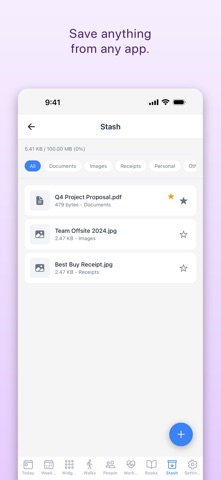
Tell PlanPal what your day looks like. It builds the schedule — then rebuilds it when the day goes sideways. Most planners are a list you feel guilty about by 2pm. PlanPal plans with you: ask it to lay out tomorrow around your goals, and when this morning runs long, ask it to recalibrate what's left. You review every change before it lands on your calendar. PLAN WITH AI, NOT JUST A CHATBOT - "Plan tomorrow" builds a real schedule from your goals, habits and open tasks - "Plan today" recalibrates the rest of your day around what actually happened - Every proposal arrives as time blocks you accept, edit or reject — nothing moves on its own - AI-written notes and context on any task, in plain language BUILT DEEP INTO iOS - Live Activities on the Lock Screen and Dynamic Island for walks, focus timers and reading - Home screen widgets for steps, mindfulness minutes and your current book - Share anything from any app straight into your Stash file vault - Siri: ask for your daily summary, your step count, or have your brief read aloud - Apple Health two-way sync for steps, mindfulness and workouts A PLANNER THAT KEEPS THE PAPER FEEL - Two-day spread view, the way a physical planner opens - Week view for the whole seven days at a glance - A/B/C priority levels, drag to reorder, timers on any task - Unfinished tasks roll forward automatically — or pin them to a date that can't move - A real weekly review: triage what slipped, carry it, reschedule it, or shelve it with a reason MOVEMENT AND FOCUS, TRACKED PROPERLY - GPS walks with a live route map, steps, distance and pace - Suggested routes sized to close your step goal - Workout templates with sections, circuits and rounds, plus a guided player with rest timers - Focus and Pomodoro sessions that keep running when you leave the app - Meditation timer with 4-7-8 breathing and ambient sound - Reading sessions tracked like workouts, with page counts and a reading goal HABITS AND PEOPLE - Recurring habits on daily, weekly, monthly or custom schedules, with streaks - Relationship goals — "walk with Mom twice a week" — tracked like any other commitment - Import contacts and log the interactions that matter WORKS EVERYWHERE YOU DO - Full web app for the desktop, built for large displays - Two-way Google Calendar sync - Weather, stocks, quotes, habits and more on a configurable widget dashboard - Start using it immediately — no account required FREE AND PREMIUM PlanPal is free to use: daily and weekly planning, habits, walks, reading, focus sessions, meditation, Stash and widgets. PlanPal Premium unlocks the AI chat assistant, AI task notes, Google Calendar sync, workout templates and tracking, and unlimited widgets and favorites. Premium is an annual subscription. Payment is charged to your Apple Account at confirmation of purchase. It renews automatically unless auto-renew is turned off at least 24 hours before the end of the current period; your account is charged for renewal within 24 hours prior to the end of the current period. You can manage and cancel subscriptions in your Apple Account settings after purchase. Terms of Use (EULA): https://planpal-ai.app/terms Privacy Policy: https://planpal-ai.app/privacy
Latest release
What’s New
- Fixed meditation sessions sometimes logging extra minutes if you switched to another app partway through. - Meditation now shows a live countdown bar you can see from anywhere in the app, not just the Meditation screen. - Your daily mindfulness progress on the Today screen now updates instantly when a session finishes. - The AI Data Sharing screen now describes exactly what is sent to our AI providers, including activity summaries and the names of contacts you ask the assistant about. - Building a workout from a description now asks for AI data sharing if you haven't turned it on, instead of failing with an error. - Turning AI data sharing off now reliably stops your content being sent, everywhere in the app.
Audience growth
Ratings growth
Baseline captured. Growth appears after the crawler observes a changed rating count.
Momentum comes from crawler snapshots for the tracked storefront. “Viral growth signal” means unusually fast recent rating gains; it is an indicator, not download data.
Price tracking
Price intelligence
First snapshot captured. The trend line starts after the next crawler price observation.
- First observed Aug 29, 2026 · 11:29 PM Free
Screenshots