About this app
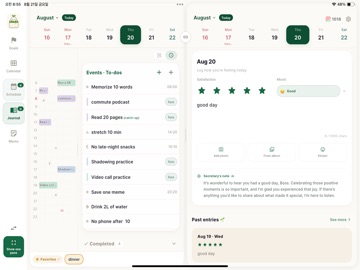
11 PM. You were busy all day — so why does it feel like nothing happened? That emptiness isn't a lack of plans. It's that you can't see them adding up. Plantri draws your day in 10-minute cells, and every check visibly fills up your goal progress. If your January goals are still asleep in the corner of a diary, Plantri breaks them down and brings them onto today's timetable. 30 minutes of exercise, 10 minutes of English — every small cell you fill earns you gems, and your secretary leaves a warm reply on today's log. ◆ Goals become schedules ・Break a core goal into sub-goals and action steps, and place them right on the timetable ・Finished tasks roll up into your goal progress automatically ・See at a glance which goal today's effort is feeding ◆ A 10-minute grid you can feel ・Swipe across the grid to create a task — one cell is 10 minutes ・To-dos live on the timetable as marks — they fill with color when done ・Make a to-do in the list, then drag it onto the grid when you're ready ・Springy animations, haptics on every check, confetti when you finish the day ◆ All your calendars in one place ・Import Apple, Google, and Naver Calendar events as they are (even bookings) ・Multi-day events show as connected bands — long-press and drag to create one ◆ A secretary who reads your day ・A warm reply to your short journal, pattern insights on your weekly log ・Start each day with a morning briefing ◆ Small wins become gems ・Earn gems every time you finish a task or set a new goal ◆ Memos, freely and deeply — merge, organize, add checkboxes and photos ◆ Made to feel easy — a hands-on tutorial that teaches by doing, two layout modes, Google/Apple sign-in sync ◆ Plantri Pro Unlimited goals, tasks and to-dos, photos in journals and memos, every mark, unlimited AI replies. ・Auto-renewable yearly/monthly subscription. Payment is charged to your Apple ID account at confirmation of purchase. It renews automatically unless cancelled at least 24 hours before the end of the current period. Manage or cancel anytime in your App Store account settings. ・Terms of Use: https://secret-secretary-b67da.web.app/terms.html ・Privacy Policy: https://secret-secretary-b67da.web.app/privacy.html Turn your goals into today's action, with Plantri.
Latest release
What’s New
This update makes planning and organizing smoother across your timetable, calendar, and memos. • Collapse or expand the daily timetable, with clearer weekly labels, tap-to-edit, and more responsive resizing. • Unscheduled events and to-dos now appear first, and you can choose “Not today” from a to-do’s details. • Edit or delete sticky-note memos from their menu, with improved completed-memo visibility, checkbox feedback, and scroll stability. • Receive a warm reminder to reflect on your day every night at 9 PM. • Fixed an issue where events and to-dos could remain after deleting a goal, and improved notifications, widgets, and overall stability on iOS and Android.
Audience growth
Ratings growth
Baseline captured. Growth appears after the crawler observes a changed rating count.
Momentum comes from crawler snapshots for the tracked storefront. “Viral growth signal” means unusually fast recent rating gains; it is an indicator, not download data.
Price tracking
Price intelligence
First snapshot captured. The trend line starts after the next crawler price observation.
- First observed Sep 3, 2026 · 7:12 PM Free
Screenshots