About this app
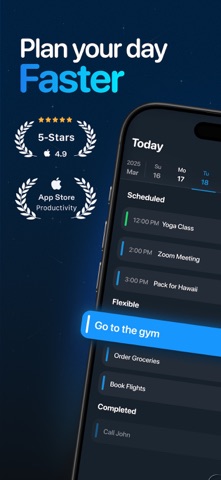
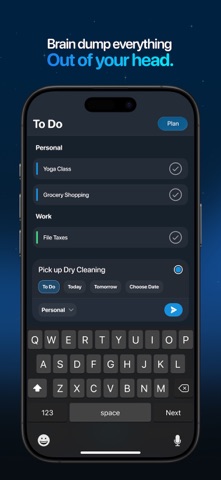
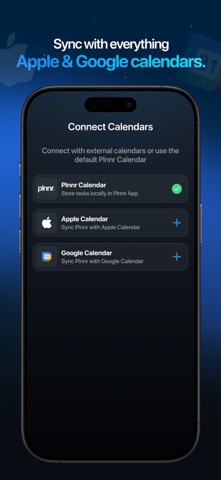
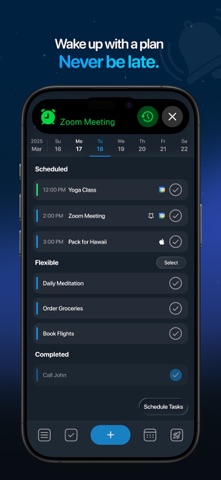
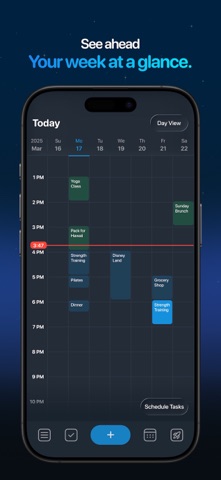
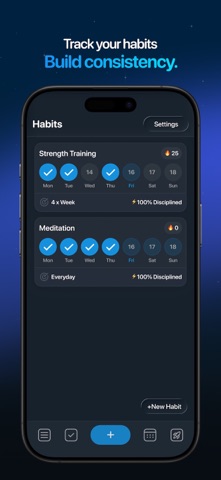
Plan your day in 30 seconds - then actually stick to it. Plnnr is the daily planner that fits how your brain actually works. Capture what’s in your head, drop it onto your day, and build the habits that move you forward - all in one clean, fast app. Everyone knows planning their day pays off. Almost nobody keeps it up, because every other tool turns a 2-minute habit into a chore: calendars are too rigid, notes are too messy, to-do apps take too many taps. plnnr closes that gap. PLAN YOUR DAY IN SECONDS Capture to-do’s the moment they pop into your head. Group them into custom sections, set reminders, and drag them straight onto your calendar. SEE YOUR WHOLE DAY AT ONCE Scheduled time blocks and flexible to-do’s on one clean screen. Zoom out to a monthly view to see everything coming. BUILD HABITS THAT STICK Track your habits, build streaks, and watch your discipline score climb month over month. NEVER MISS WHAT MATTERS Alarms that ring even on silent, plus interactive home screen widgets - check tasks off without opening the app. ALL YOUR CALENDARS IN ONE PLACE Sync your Apple and Google calendars and manage everything in a single view. WORKS THE WAY YOU THINK Built for speed. Add, edit, and reorder in seconds. Plan light when you’re busy, go deeper when you need structure. GREAT FOR - Daily planning - To-do and action lists - Time blocking - Habit tracking and accountability - Calendar planning - Staying organized without the stress Download plnnr and plan your day in 30 seconds. Terms of Use: https://plnnrapp.com/termsofuse Subscription Required This app requires a subscription to access all content and features. Available Plans: $7.99 per month (no free trial) $29.99 per year (no free trial) $49.99 per year with a 7-day free trial Additional Information: Payment will be charged to your Apple ID account at confirmation of purchase. Subscriptions automatically renew unless canceled at least 24 hours before the end of the current period. You can manage or cancel your subscription in your App Store account settings.
Latest release
What’s New
Your day, briefed. Morning Brief – Wake up. Tap. See your whole day. One notification lays out your schedule, your top flexible tasks, and how your discipline is trending this month. No opening the app and poking around — just your day, ready. Evening Brief – Close out today. Glance at tomorrow. Check off anything still open, see what tomorrow already looks like, and if it's empty, plan it in about 30 seconds. Go to bed with tomorrow handled. Both live in Settings — turn them on or off anytime, and pick the exact time your Morning Brief arrives. Light Mode. And a Rose theme. – The two new looks we teased are here. A clean light mode for a brighter planner, and a soft rose color scheme. Preview either live and pick your favorite during setup or in Settings → Appearance. Also new: choose your default Calendar view (Day, Week, or Month) so it always opens just how you like it. And Flexible tasks due more than a week out no longer disappear — they're grouped into an expandable "Later" list instead. A fresh start for new users – We rebuilt sign-up from the ground up, including a live theme picker as the very last step. Fixed: disabling a connected Google Calendar now instantly hides its events everywhere, and re-enabling brings them right back. Bug fixes and improvements.
Audience growth
Ratings growth
Baseline captured. Growth appears after the crawler observes a changed rating count.
Momentum comes from crawler snapshots for the tracked storefront. “Viral growth signal” means unusually fast recent rating gains; it is an indicator, not download data.
Price tracking
Price intelligence
First snapshot captured. The trend line starts after the next crawler price observation.
- First observed Aug 21, 2026 · 11:09 PM Free
Screenshots