About this app
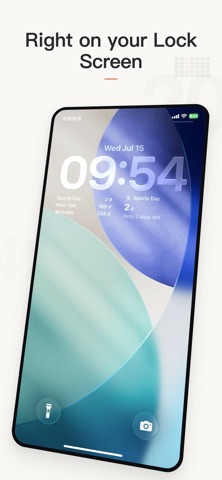
Countdown — the countdown that never gets lost. How many days until the wedding? How long since you started the job? Exams, paydays, anniversaries, trips, a new baby — put every day that matters on your Home Screen and Lock Screen and see it at a glance. WHY YOU'LL LOVE IT · iCloud Sync — switch phones or move between iPad and iPhone, your data is always there · Auto Flip — when the day arrives, a countdown becomes a count-up. "Until the wedding" turns into "married for 365 days" — one event, tracked for life · Working-Days Mode — count only Mon–Fri: "15 working days until delivery" · Smart subtitle — far dates read "2 months 12 days" or "~3 weeks", not just a raw day count · Repeat rules — daily, weekly, monthly, yearly and lunar 6 WIDGETS + LOCK SCREEN · Focus (small / medium) — keep your eyes on the one day that matters · Timeline List — every countdown on one screen, past vs upcoming at a glance · Calendar — this month's due dates highlighted · Progress Ring — a Lock Screen circular view · Lock Countdown — a single countdown below the clock · Lock Top 3 — your three nearest countdowns below the clock CLEAN & PRIVATE · Completely free — no ads, no in-app purchases, no subscriptions · No account, no sign-in · Collects no data, no third-party tracking — everything stays in your own iCloud BUILT FOR EVERYONE · Dynamic Type & VoiceOver · Dark / Light · Multiple languages Put the days that matter where you can see them. Privacy Policy: https://shangxi676.github.io/DailyCheckin-Pages/minus_privacy_policy.html Terms of Use: https://shangxi676.github.io/DailyCheckin-Pages/minus_termsofservice.html
Latest release
What’s New
This update brings a smoother, more reliable experience: · Improved widget refresh — remaining days and progress now update faster and more accurately · Improved iCloud sync — check your sync status anytime in Settings · Improved first-launch initialization — no more duplicate sample events · Fixed several UI and interaction issues for greater overall stability As always: completely free. No ads. No in-app purchases. Your data lives only in your iCloud, never lost.
Audience growth
Ratings growth
Baseline captured. Growth appears after the crawler observes a changed rating count.
Momentum comes from crawler snapshots for the tracked storefront. “Viral growth signal” means unusually fast recent rating gains; it is an indicator, not download data.
Price tracking
Price intelligence
First snapshot captured. The trend line starts after the next crawler price observation.
- First observed Aug 26, 2026 · 11:32 PM Free
Screenshots