About this app
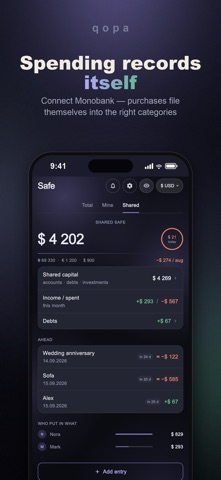
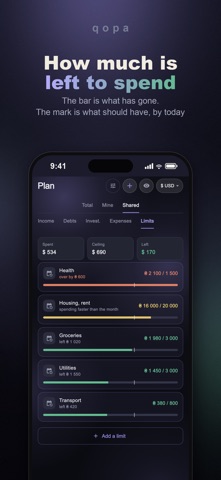
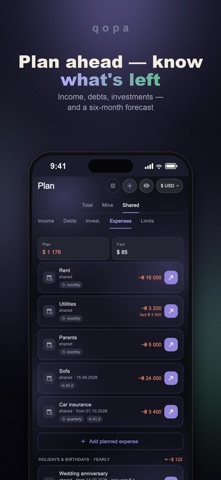
Qopa is an app for a couple's shared finances. Shared money and personal money sit side by side, every movement knows whose it is, and the totals add themselves up. A shared budget breaks down over bookkeeping, not over money: one pays by card, the other in cash, and part of the spending is shared. A month later nobody remembers who put in what, or why there is less in the account than it felt like. Qopa keeps that record for you. WHAT'S INSIDE • Shared money and personal money in one place • See who put in what • Any currencies, with your own rates • Monobank import for spending • A plan and a six-month forecast • Cash, banks, crypto, investments, debts PRIVACY The key is derived from your password on the device, the data is encrypted there too, and only ciphertext ever reaches the server. The developer cannot read your accounts or your amounts. No ads, no data selling. WHO IT'S FOR For a couple who keep a shared budget and still have money of their own. And for one person who wants an honest record without the cloud and without ads. SUBSCRIPTION Qopa Monthly — $1.99 · Qopa Yearly — $9.99 (7 days free) · Qopa Lifetime — $24.99 one-off. Payment is charged to your Apple ID account at confirmation of purchase. A subscription renews automatically unless auto-renew is turned off at least 24 hours before the end of the current period. You can manage your subscription and turn off auto-renew in your Apple ID settings. Terms of Use (EULA): https://www.apple.com/legal/internet-services/itunes/dev/stdeula/ Privacy Policy: https://qopa.qbdp.online/privacy.html Made in Ukraine
Latest release
What’s New
The app now fits the way you keep money. At first setup — or any time in «More → Modules» — choose solo or the two of you, and which sections you actually need. Plans, limits, debts, investments, several currencies, Monobank import — turn on only what you use. What's off hides from the tabs and the home screen, and the data stays: change your mind and one switch brings it back. Solo mode drops everything about «two»: no shared tabs, no «who put in what» — just a personal budget. Fixed the small things we found along the way.
Audience growth
Ratings growth
Baseline captured. Growth appears after the crawler observes a changed rating count.
Momentum comes from crawler snapshots for the tracked storefront. “Viral growth signal” means unusually fast recent rating gains; it is an indicator, not download data.
Price tracking
Price intelligence
First snapshot captured. The trend line starts after the next crawler price observation.
- First observed Aug 23, 2026 · 7:10 PM Free
Screenshots