About this app
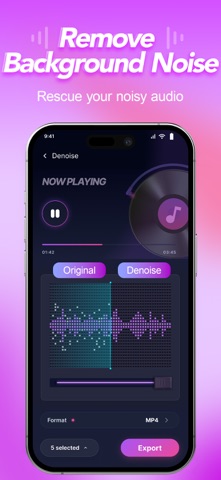
Transform your phone into a professional audio studio. ReAudio combines a stunning cyberpunk interface with powerful video to MP3 converter, vocal remover, multitrack editing and background noise remover, empowering you to visualize, mix, and master audio like a pro. Whether you are a social media creator, podcaster, or a musician, ReAudio offers an immersive visual experience that makes complex audio tasks intuitive and precise. No clunky menus—just a sleek, modern timeline designed for creativity. WHAT MAKES REAUDIO DIFFERENT? Immersive Visual Studio (New Design!) Experience audio editing in a whole new way. Our sleek Cyberpunk Dark Mode and high-contrast Neon Waveforms let you "see" the music. The intuitive layout mimics professional desktop software, giving you precise control over every beat without the complexity. Creative Audio Toolkit • Video to MP3 Converter & Audio Extractor: Turn any video from TikTok, YouTube, Instagram or your local library into high-quality MP3/M4A/AAC/WAV audio in seconds. Extract pure sound seamlessly without losing quality, turning video content into portable audio you can listen to anytime, anywhere. • Vocal Remover: Stop struggling with noisy tracks—extract vocals or instrumentals instantly for practice, editing, or performance. • Advanced Denoise: Effortlessly clean up background hums, hiss and noisy recordings for crystal-clear voiceovers, podcasts and audio tracks. • Spatial Reverb: Transform flat recordings into rich audio with room, hall, or cathedral effects. • 10-Band Equalizer: Boost the bass or clarify vocals with a graphic EQ. • Pitch & Speed: Change the tempo without affecting pitch, or shift the key for creative voice effects. Professional Multitrack Editor Don't just trim—mix. • Layer Tracks: Combine vocals, background music, and sound effects on separate tracks. • Visual Timeline: Drag, drop, and rearrange clips with a clear view of your entire project. • Precision Control: Split, cut, and duplicate audio clips with sample-level accuracy. Instant Ringtone Maker Hear a sound you love on TikTok, YouTube, or a video? Capture it instantly. • Extract Audio: Convert video to audio in seconds. • Custom Ringtones: Trim the best part and set it as your personalized ringtone or alarm notification effortlessly. POWERFUL FEATURES FOR CREATORS: • Lossless Export: Save your projects in high-quality formats (MP3, WAV, M4A). • Fade In/Out: Apply smooth transitions for a professional touch. • Volume Booster: Increase the volume of quiet recordings without distortion. • File Management: Organize your works with a visual library and waveform previews. ReAudio is Perfect For: • Content Creators: Preparing audio for Reels, TikTok, or YouTube. • Podcasters: Mixing intro music, voice, and sound effects. • Musicians: Sketching demos or practicing with slowed-down tracks. • Everyone: Extracting audio from videos, cleaning up recordings, creating unique ringtones and managing audio files. Subscription ReAudio offers free audio editing tools, while premium features such as batch processing, high-quality audio export require a subscription. Subscription plans are available weekly, monthly, or yearly. Subscriptions automatically renew unless canceled at least 24 hours before the end of the current period. Manage or cancel anytime in your Apple ID account settings. Download ReAudio now and unleash your creativity with the ultimate mobile audio studio! Privacy Policy: https://www.goedgelab.com/privacy.html Terms of Service: https://www.goedgelab.com/terms.html
Latest release
What’s New
Performance improvements.
Audience growth
Ratings growth
Baseline captured. Growth appears after the crawler observes a changed rating count.
Momentum comes from crawler snapshots for the tracked storefront. “Viral growth signal” means unusually fast recent rating gains; it is an indicator, not download data.
Price tracking
Price intelligence
First snapshot captured. The trend line starts after the next crawler price observation.
- First observed Aug 26, 2026 · 8:57 AM Free
Screenshots