About this app
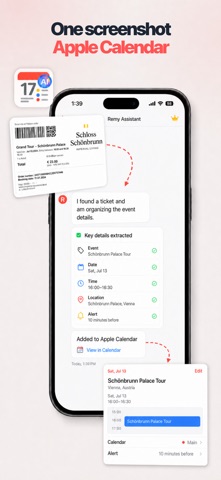
# Remy: Screenshot to Apple Calendar Stop retyping dates from screenshots. Remy turns the messy inputs of daily life — chat screenshots, email confirmations, tickets, boarding passes, flyers, posters, and handwritten notes — into clean Apple Calendar events and Reminders. Remy is not another calendar app. It is an AI assistant for the calendar you already use. ## What Remy Does Screenshot to Calendar - Import a screenshot from Messages, WhatsApp, email, Notes, or any app - Extract event title, date, time, location, notes, and reminders - Review the result before saving - Add directly to Apple Calendar Photo to Calendar - Snap flyers, invitations, posters, agendas, tickets, and boarding passes - Turn printed schedules into structured events - Add travel and appointment reminders in seconds Apple Calendar & Reminders - Works with your existing Apple Calendar setup - Create and update reminders naturally - No calendar migration, no new system to learn Everyday AI Assistant - Ask Remy to create events or reminders in plain language - Clean up vague plans into structured calendar items - Keep important details where you already organize your life ## Perfect For - Busy professionals who receive meeting details in screenshots - Travelers managing flights, hotels, tickets, and appointments - Students tracking classes, exams, and assignment deadlines - Parents coordinating school notices, events, and activities - Anyone tired of copying dates and times by hand ## Privacy Calendar and reminder items are saved to Apple Calendar and Reminders on your device. When AI extraction is needed, Remy processes only the content you choose to submit. We do not sell your personal information or create a separate cloud calendar database. Turn your next screenshot into a calendar event with Remy. Terms of Use: https://www.apple.com/legal/internet-services/itunes/dev/stdeula/
Latest release
What’s New
A quieter, more focused look throughout. Review cards now follow Apple's own event layout, with a map for locations, and a delete confirmation you can tell apart at a glance.
Audience growth
Ratings growth
Baseline captured. Growth appears after the crawler observes a changed rating count.
Momentum comes from crawler snapshots for the tracked storefront. “Viral growth signal” means unusually fast recent rating gains; it is an indicator, not download data.
Price tracking
Price intelligence
First snapshot captured. The trend line starts after the next crawler price observation.
- First observed Aug 31, 2026 · 9:33 PM Free
Screenshots