About this app
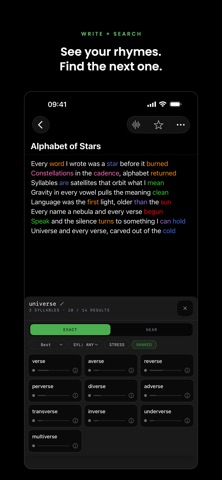
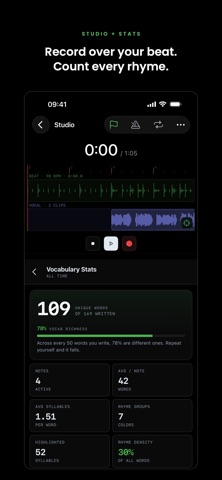
Rhyme Notes is a lyric notebook for rappers and writers — a rhyme engine, a recording studio, a word generator and a stats page, all running on your phone. • RHYME SEARCH — 140,000+ words, multisyllabic, ranked by strength, with a definition on tap • AUTO-HIGHLIGHTING — your rhyme schemes painted in color as you type • RECORDING STUDIO — loop-record your takes over the beat, then slice, stack and mix the vocals • WORD GENERATOR — a hand of words to freestyle off • VOCABULARY STATS — every word you have ever written, counted and tracked Offline, and no account. No bar ever leaves your phone. FIND THE RIGHT RHYME • Instant rhyme search across 140,000+ English words, plus German, Spanish, and French dictionaries • Multisyllabic matches ranked by strength — exact, near, and stress patterns • Popularity-aware ranking, so real usable words come first • Tap any word for its definition PAINT YOUR RHYME SCHEMES • Highlight rhymes at the syllable level — tap a syllable, pick a color • Auto-highlighter finds and colors rhyme groups for you, even while you type • 16-color palette plus your own custom colors RECORD IN THE STUDIO • Import beats into your library and lock your bars to a BPM grid • Record vocals with a count-in, metronome, and latency calibration • Loop a section and stack takes hands-free • Slice, move, and mix clips on the timeline — then export the mix KARAOKE VIDEOS • On-device speech recognition syncs your recorded vocals to your written lyrics, word by word • Karaoke view that carries your rhyme colors • Export vertical karaoke videos with custom styles, fonts, and backgrounds • Or export your lyrics as a clean shareable image DRILL YOUR FREESTYLE • Deal up to eight words a press — nouns, verbs, adjectives, adverbs, or anything • Turn on "all words rhyme" to drill a single sound, off to bridge words that don't belong together • Tap a word to keep it, and the next hand builds around it • Syllable count on every card, and a beat you can load and rap over WATCH YOUR VOCABULARY GROW • Unique words, total words and vocabulary richness across everything you have written • Your most-used words, and your word count month by month • Rhyme density on every note, live under the editor MADE FOR WRITERS TOO • Folders, tags, favorites — a real notepad underneath • Share complete projects between phones as .rnote files PRIVACY FIRST Everything runs on your phone. No account, and your lyrics are never uploaded — speech recognition happens entirely on-device. RHYME NOTES PRO (optional subscription) Removes ads, and unlocks watermark-free video and image exports plus custom branding text on your exports. Monthly or yearly, 7-day free trial, cancel anytime. Payment is charged to your Apple ID account. Subscriptions renew automatically unless cancelled at least 24 hours before the end of the current period. Manage or cancel in your Apple ID Account Settings. Terms of Use: https://www.apple.com/legal/internet-services/itunes/dev/stdeula/ Privacy Policy: https://soundwave4.github.io/rhymenotes-privacy/PRIVACY_POLICY
Latest release
What’s New
A new look, top to bottom — and a new icon on your home screen. Rhyme search fits three columns instead of two, so twelve results are in view where eight used to be. Each card carries the word, how well it matches, and how common it is, and long words wrap instead of cutting off the part that rhymes. Your notes are a grid of cards. In the editor, highlighted words pick their own ink, so the text stays readable on a light fill instead of disappearing into it. In Studio, the transport is one solid block instead of scattered buttons, and the bar ruler counts from 1. The Sync pane now tells you to record first, instead of waiting for you to press the button and then refusing. The Word Generator holds the words you want to keep while you re-roll the rest. Vocabulary stats open with one number instead of eleven tiles. Latency calibration is three numbered steps with a real dB meter, and it no longer dead-ends if you deny the microphone the first time. Three gestures that never had a visible handle now say they exist.
Audience growth
Ratings growth
Baseline captured. Growth appears after the crawler observes a changed rating count.
Momentum comes from crawler snapshots for the tracked storefront. “Viral growth signal” means unusually fast recent rating gains; it is an indicator, not download data.
Price tracking
Price intelligence
First snapshot captured. The trend line starts after the next crawler price observation.
- First observed Sep 7, 2026 · 11:49 AM Free
Screenshots