About this app
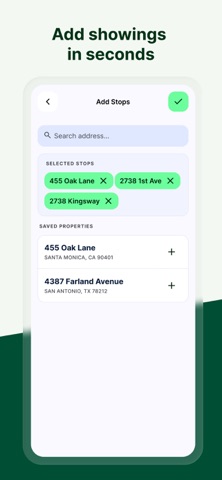
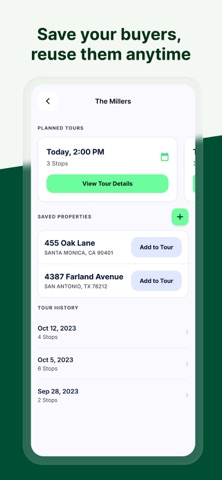
Showing Planner helps real estate agents plan showing tours in minutes — and spend less time driving between them. Add the homes you're showing, pick the client you're taking out, and let Showing Planner map the smartest order to visit every stop. No more juggling addresses, guessing drive times, or backtracking across town. Showing Planner Pro is an auto-renewing monthly subscription that unlocks unlimited stops. Payment is charged to your Apple ID at purchase and automatically renews each month unless canceled at least 24 hours before the end of the current period. Manage or cancel anytime in your App Store account settings. Terms of Use (EULA): https://www.apple.com/legal/internet-services/itunes/dev/stdeula/ Privacy Policy: https://liuhaoqianw.github.io/showing-planner-legal/privacy.html
Latest release
What’s New
- Faster tour scheduling: start time now snaps to 5-minute intervals - Date and time pickers redesigned as clear pop-up overlays with an explicit Save button - Changes on the Tour Edit screen now save instantly - New: edit or delete a client directly from their detail page - Minor UI polish and bug fixes
Audience growth
Ratings growth
Baseline captured. Growth appears after the crawler observes a changed rating count.
Momentum comes from crawler snapshots for the tracked storefront. “Viral growth signal” means unusually fast recent rating gains; it is an indicator, not download data.
Price tracking
Price intelligence
First snapshot captured. The trend line starts after the next crawler price observation.
- First observed Sep 14, 2026 · 3:26 PM Free
Screenshots