About this app
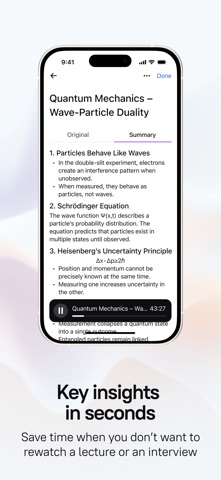
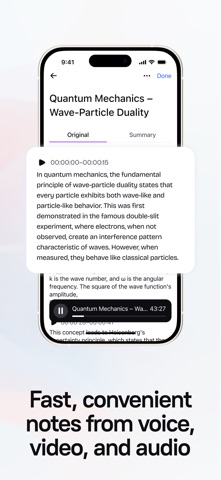
Speakr AI Note Taker: Audio and Video Transcription, Note-Taking & More Capture every moment and stay organized with Speakr—whether it’s a meeting, lecture, or video call, never miss a key detail. With powerful audio and video summaries, advanced note editing, and smart folder organization, Speakr transforms your conversations and content into actionable insights. Put Speakr to work today to summarize, edit, and organize your ideas effortlessly. KEY FEATURES OF SPEAKR Audio & Video Summaries • Summarize audio recordings from meetings, interviews, or personal notes with AI precision. Get concise takeaways instantly. • Transform video content—lectures, webinars, or calls—into clear summaries, so you focus on what matters most. Note Editing • Edit your summaries and notes with ease. Refine text, add details, or highlight priorities to make every note your own. • Perfect for students, professionals, or anyone who wants polished, actionable records.Perfect for students, professionals, or anyone who wants polished, actionable records. Intelligent Summaries • Speakr’s advanced AI technology transforms lengthy audio and video content into concise, actionable summaries. • Whether it’s a conversation, lecture, or video call, you’ll get key takeaways at a glance. • Includes organized lists, editable notes, and to-dos so you can focus on what matters most. Privacy & Security Focus • Your audio, video recordings, and notes are fully secure with Speakr. • You’re in complete control—easily export or delete your files whenever you need. • Ensures your data stays private and protected. Unlimited Recording Time • Speakr lets you record without limits, from quick voice memos to extended video sessions. • You’ll never have to worry about running out of time mid-recording. • Offers total flexibility for all your needs. Easy Organization and Sharing • Speakr’s intuitive interface simplifies categorizing and organizing recordings and summaries into custom folders. • All content is easily searchable—perfect for students, professionals, and everyday users. FLEXIBLE USE CASES For Professionals: • Delivers precise summaries of meetings and video calls. • Lets you stay engaged without scrambling to take notes. • Edit and organize them for seamless follow-ups. For Students and Educators: • Record and summarize lectures, video tutorials, or study sessions with ease. • Organize notes into folders for quick review before exams or projects. For Journalists: • Capture interviews or video footage and summarize them into editable text. • Speeds up editing and article writing. For Everyone: • Use Speakr as a digital notepad, memo recorder, or to capture key moments from calls. • Versatile and user-friendly design works for every type of user. DESIGNED FOR MAXIMUM PRODUCTIVITY Speakr streamlines your workflow: • Boost efficiency with instant audio and video summaries — no more endless replaying. • Stay in control with editable notes tailored to your needs. • Organize effortlessly with folders, making every file easy to locate and share. Get Started with Speakr Today Terms of Use: https://agreement.speakr.app/terms.html Privacy Policy: https://agreement.speakr.app/privacy_policy.html
Latest release
What’s New
Bug fixes
Audience growth
Ratings growth
Baseline captured. Growth appears after the crawler observes a changed rating count.
Momentum comes from crawler snapshots for the tracked storefront. “Viral growth signal” means unusually fast recent rating gains; it is an indicator, not download data.
Price tracking
Price intelligence
First snapshot captured. The trend line starts after the next crawler price observation.
- First observed Aug 23, 2026 · 3:48 PM Free
Screenshots