About this app
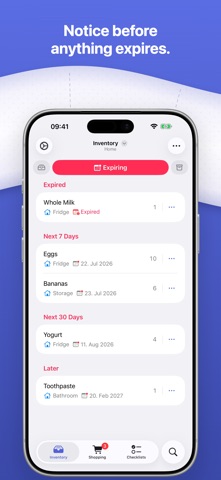
Supplies tracks everything you keep at home: food, cleaning supplies, medicine, and whatever else fills your cupboards, closets, and garage. Add what you have, note where it lives, then see at a glance what's running low, what's about to expire, or what to pick up next time you're out. KEY FEATURES - Create multiple inventories: add more inventories beyond your main one, each fully separate with its own items, shopping list, and expiration view. - Organize by location: sort items by fridge, freezer, or any place you choose, and give every status its own icon and color. - Watch the expiration timeline: everything groups by urgency, showing what's expired, what's due this week, and what's coming up next. - Build a shopping list: add what you're running low on and check items off as you shop, right from the interactive home screen widget. - Make custom checklists: reuse a list for a recipe, a trip, or an emergency kit whenever you need it. - Share an inventory: let family or housemates view and edit alongside you, while every change syncs through iCloud. WHY SUPPLIES? - One place for your whole home. Track food, medicine, cleaning supplies, and everything else you keep, instead of relying on scattered notes or memory. - Made for every room. Supplies works just as well for the garage, bathroom, or medicine cabinet as it does for the pantry. - Private by default. There's no account to create, and everything syncs securely through your own iCloud. Supplies is free to download. Start with your first inventory, assign labels, keep a checklist, and see everything on the expiration timeline at no cost. Supplies Plus adds multiple inventories, inventory sharing, custom labels, unlimited checklists, and expiration alerts, with a 14-day free trial. Download Supplies and know what you have. Privacy Policy: https://supplies-app.com/privacypolicy/ Terms of Use: https://www.apple.com/legal/internet-services/itunes/dev/stdeula/
Latest release
What’s New
FEATURES - Supplies is now on Apple Watch. See your shopping list on your wrist, check items off as you shop, and put purchases away when you're home — plus you can add the shopping list to your watch face. - Shortcuts support. Look up your items, inventories, shopping list, and checklists without opening the app. IMPROVEMENTS - See everything that's changed in the app, release by release — tap What's New in Settings. - Bug fixes and performance improvements.
Audience growth
Ratings growth
Baseline captured. Growth appears after the crawler observes a changed rating count.
Momentum comes from crawler snapshots for the tracked storefront. “Viral growth signal” means unusually fast recent rating gains; it is an indicator, not download data.
Price tracking
Price intelligence
First snapshot captured. The trend line starts after the next crawler price observation.
- First observed Sep 17, 2026 · 6:50 PM Free
Screenshots