About this app
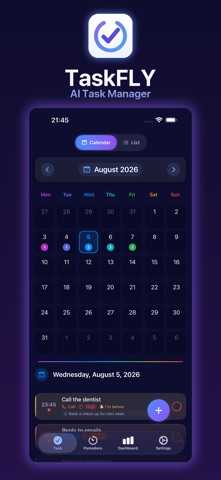
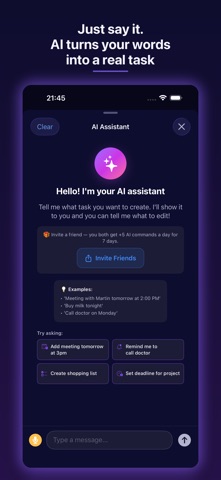
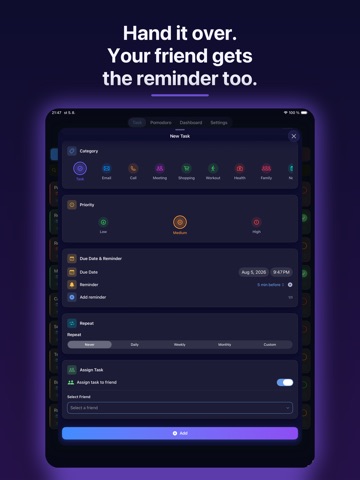
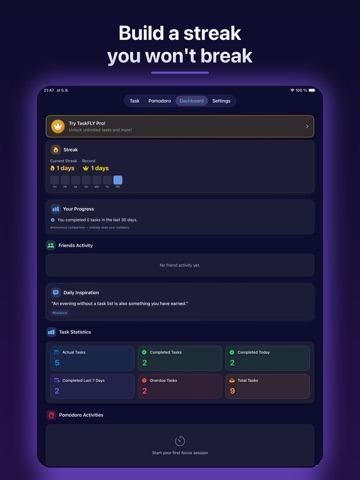
TaskFLY is the AI-powered to-do list and planner that turns the way you talk into a perfectly organized day. Just say what you need — "Meeting with Martin tomorrow at 2 PM" — and TaskFLY creates the task with the right date, category, and reminder. No forms. No fuss. WHY YOU'LL LOVE TASKFLY AI ASSISTANT — VOICE OR TEXT Speak or type in plain language and let AI do the rest. It understands dates, times, and priorities, sets smart reminders automatically, and can even edit or complete tasks on command — in your language. CALENDAR + LIST IN ONE See your whole day at a glance in a beautiful calendar, or switch to a focused list. Color-coded categories and priorities keep everything clear. POMODORO FOCUS TIMER Work in deep-focus sessions, take smart breaks, and link timers to specific tasks. Watch your focus time add up. STREAKS & DASHBOARD Stay motivated with daily completion streaks, achievement badges, and a dashboard that shows your real progress. SHARE & DELEGATE Add friends, assign tasks, and collaborate. See who's doing what — perfect for couples, families, and small teams. SMART REMINDERS Never miss a thing. TaskFLY sets sensible default reminders and lets you fine-tune them to the minute. 11 LANGUAGES Fully localized: English, Slovak, Czech, German, Spanish, French, Hungarian, Italian, Polish, Russian, Ukrainian. PRIVACY-FIRST Your data is yours. Use TaskFLY as a guest with local storage, or sign in for encrypted cloud sync across your devices. Full GDPR consent controls. No tracking without your permission. TASKFLY PRO Unlock unlimited tasks and keep the AI assistant beyond your first week — up to 30 AI commands a day, longer requests, daily reminders at a time you choose, and your own defaults for new tasks. Start with a 7-day free trial — cancel anytime. Download TaskFLY and let AI plan your day, so you can focus on getting it done. Terms of Use: https://www.aesa.sk/en/taskfly-terms-of-use/ Privacy Policy: https://www.aesa.sk/en/taskfly-privacy-policy/ Support: https://www.aesa.sk/en/taskfly/
Latest release
What’s New
TaskFLY 2.0.3 — your tasks, right on your Home Screen: • New: Home Screen and Lock Screen widgets — see today's tasks, your streak and progress at a glance, and add a task with one tap • New: Pomodoro Live Activity — your focus timer runs on the Lock Screen and in the Dynamic Island • The streak reminder now tells you exactly how many days are on the line, so you never lose your streak by accident • A cleaner Pro screen that shows what you got done this week • New: a “Your Progress” card on the dashboard shows how you compare with other TaskFLY users — anonymous, counts only, and you can turn it off in Settings • New: rate TaskFLY straight from Settings whenever you feel like it • New: report a problem straight from Settings — it reaches us with your app and device details attached, no email needed • New: a short “How to use TaskFLY” guide for the things that are easy to miss • New: all-new daily inspiration — 90 lines written for each of the 11 languages • Add to calendar now keeps the time you set, and the alert lands where your reminder is • Tapping any notification now takes you to the right place — the request, your friends list or the task itself • The buttons on the focus timer notification now complete the session or start the next one right from the Lock Screen • Daily reminders now switch language together with the app • Setting a reminder time no longer jumps the form back to the top • Deleting your account now removes your cloud data reliably, and retries if anything goes wrong • Reminder and sharing fixes, plus stability improvements • Clearer task filters and cards, onboarding aligned with the app, Delete Account under Sign Out, and more reliable widget deep links • New: your sent friend requests now have their own tab — see who you invited and withdraw a request before it is answered • Fixed: several screens showed English text in German, Spanish, French, Hungarian, Italian, Polish, Russian and Ukrainian Thanks for your feedback!
Audience growth
Ratings growth
Baseline captured. Growth appears after the crawler observes a changed rating count.
Momentum comes from crawler snapshots for the tracked storefront. “Viral growth signal” means unusually fast recent rating gains; it is an indicator, not download data.
Price tracking
Price intelligence
First snapshot captured. The trend line starts after the next crawler price observation.
- First observed Aug 26, 2026 · 7:22 AM Free
Screenshots