About this app
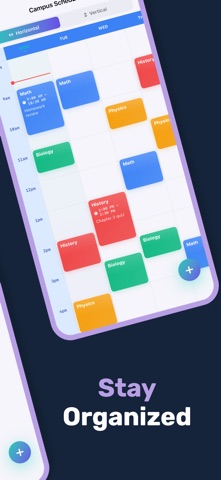
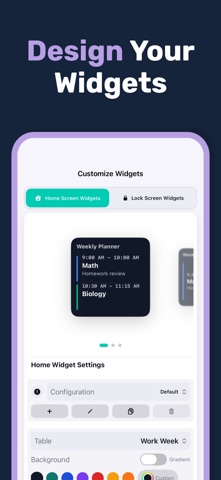
Timetable is a beautiful, feature-rich weekly schedule app for iOS and iPadOS that helps you organize classes, work, and routines with clarity. Create multiple timetables, add events with notes, colors, and reminders, and tailor your week with flexible day ranges, start-of-week, and hour settings. Track your day with a live time indicator, keep today in focus, and switch between clean horizontal or vertical layouts for fast scanning. PLAN YOUR WEEK YOUR WAY • Create and manage multiple timetables • Add events with titles, notes, and time ranges • Duplicate a timetable to reuse schedules • Choose how many days and when the day starts • Adjust day start and end hours for your routine SMART VIEWS AND FOCUS • Horizontal or vertical timetable layouts • Today column highlight and current time line • Clear event blocks that stay readable • Quick week overview with smooth animations IMPORT, SHARE, AND WIDGETS • Import a timetable from an image and review extracted events • Export your timetable as PDF or image • Home and Lock Screen widgets for at-a-glance plans • Choose which timetable appears on your widget STYLE AND PERSONALIZATION • 20 vibrant color presets plus custom colors • Theme options with glass-like cards and gradients • Dark mode and adaptive layouts for iPhone and iPad • Full localization support for multiple languages PRO FEATURES • Unlock unlimited timetables • Enable image import, exports, premium themes, and reminders Note: Timetable is free to download and use. Some advanced features require a one-time purchase or subscription to unlock. Designed for students and professionals alike, Timetable keeps your week organized and easy to scan at a glance.
Latest release
What’s New
Thank you for using our app. In the latest update, we have added several new features, including: - Widget customization options - Bug fixes and performance improvements
Audience growth
Ratings growth
Baseline captured. Growth appears after the crawler observes a changed rating count.
Momentum comes from crawler snapshots for the tracked storefront. “Viral growth signal” means unusually fast recent rating gains; it is an indicator, not download data.
Price tracking
Price intelligence
First snapshot captured. The trend line starts after the next crawler price observation.
- First observed Aug 27, 2026 · 11:57 AM Free
Screenshots