About this app
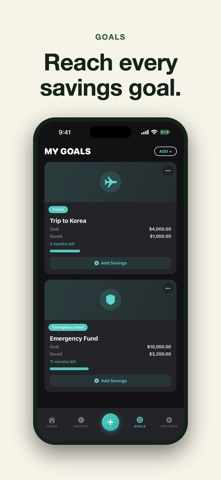
Ask Monie is the friendly way to know where your money goes — log an expense in seconds, see today at a glance, and reach every savings goal. ONE GLANCE, ONE ANSWER The Today screen opens with a single card that answers the only question that matters: am I okay today? Your spending sits right above your daily plan and how much is left, with the month's story one tap away. MAGIC LOG — TYPE A SENTENCE, GET A LOGGED EXPENSE Write "coffee 4.50 at Blue Bottle" and watch the form fill itself, right on your device. Review, tap save, done. Your words are kept in the note so nothing is lost. LOG IN SECONDS, FIX IN ONE TAP Frequent purchases become one-tap chips — and every quick log now comes with an Undo, so a mistap never writes the wrong number. Swipe any entry to duplicate or delete it. BUDGETS THAT SPEAK UP Set limits per category and get gentle alerts before you overspend — not after. Weekly or monthly, your choice. GOALS YOU CAN SEE Give every goal a card — the trip, the emergency fund, the splurge — and watch the progress bar move as you add savings. Monie cheers when you arrive. INSIGHTS THAT SEE AHEAD Smart monthly insights show your pace, category movers, and what this month will look like if you keep going — so you can change course early. RECEIPTS, SCANNED Point the camera at a receipt and the amount, merchant, and date fill in for you. Check it, save it, keep the photo attached. BEAUTIFUL ON iPAD A full sidebar layout, a floating log button, and smooth landscape everywhere. PRIVATE BY DESIGN Your money data stays in your pocket. No account to create, no bank linking required — just you and Monie. Made with care by Studio AM, a two-person studio in San Francisco. UX designed by April. Terms of Use (EULA): https://www.apple.com/legal/internet-services/itunes/dev/stdeula/
Latest release
What’s New
Performance improvements and minor fixes.
Audience growth
Ratings growth
Baseline captured. Growth appears after the crawler observes a changed rating count.
Momentum comes from crawler snapshots for the tracked storefront. “Viral growth signal” means unusually fast recent rating gains; it is an indicator, not download data.
Price tracking
Price intelligence
First snapshot captured. The trend line starts after the next crawler price observation.
- First observed Aug 25, 2026 · 9:55 PM Free
Screenshots