About this app
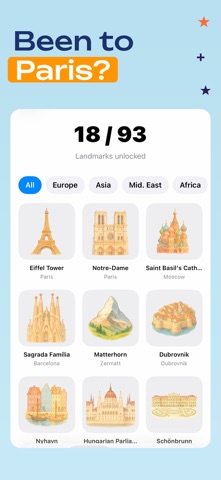
Fifty thousand photos in your library. Looking for one shot - half an hour of scrolling. Sound familiar? Pino finds them by words. Describe what was there - get the photo. No cloud, no account, no internet. Just works. Search "Birthday", "dinner at a restaurant", "beach vacation", "me with friends" - Pino understands these queries and searches by what's actually in the frame. Scenes, objects, people, emotions, weather. Voice input, typos, single word - all fine. Works on libraries from a hundred shots up to fifty thousand. Memories A carousel on the home screen: "This week, years ago." Pino pulls shots from this exact day in past years - one year back, two, five, ten. Open the app in the morning and see what you were doing on this date in other years: a trip, dinner with friends, a walk with the dog, an ordinary Wednesday at home. Tap a shot - full-screen view of that whole day. Great for stumbling onto an old photo you'd never have found yourself. Trips Pino bundles your travels into separate entries: country, dates, length, photo count. Reads geotags and figures out when you left and came back. Open an entry - and there's an automatic album from that week in Italy. Places and countries A world map with the countries you've been to - they fill in as Pino finds photos from there. Top cities ranked by photo count. Tap a country - see every shot from it. Landmarks A collection of badges for famous places: Eiffel Tower, Colosseum, Taj Mahal, Machu Picchu. A badge unlocks when you have a photo from that city. See where you've been and where you still haven't. By date and place "Yesterday", "March 2024", "last summer" - Pino understands time in words. "In Paris", "by the sea in Barcelona" - understands places. You can combine them: "photos with the dog in the park in April." Similar photos Open a shot and tap "find similar". Pino shows everything with the same scene, same place, same object. Handy for pulling together a whole trip or every photo with one person, without scrolling. Screenshots A separate tab just for screenshots. Pino reads the text inside screenshots: chats, recipes from stories, wifi passwords, handwritten notes. Search any word - it'll find the right screen. We don't run OCR on regular photos, only screenshots. On-device only Not a single photo or search ever leaves your phone. No account, no cloud, no login. Works on a plane, in the mountains, with no internet. Big libraries and iCloud If your photos are in the cloud ("Optimize Storage" mode) - Pino handles it. First it indexes what's stored locally so you can search right away. Cloud-only photos download in the background, as needed. If something's missing or broken - write to me, I reply to every email.
Latest release
What’s New
• Added country flag emoji for the places you've been • When searching screenshots, the matched text is now highlighted with a yellow marker • Fixed bugs and improved stability Thanks for using Pino.
Audience growth
Ratings growth
Baseline captured. Growth appears after the crawler observes a changed rating count.
Momentum comes from crawler snapshots for the tracked storefront. “Viral growth signal” means unusually fast recent rating gains; it is an indicator, not download data.
Price tracking
Price intelligence
First snapshot captured. The trend line starts after the next crawler price observation.
- First observed Aug 21, 2026 · 11:27 AM Free
Screenshots